Implementing a Newsletter Feature on my Website
February 27, 2025
•
5 min read
To get more eyeballs on my blog posts, I decided my website needed a newsletter feature to notify readers when a new blog post was published. I pondered using a service such as MailChimp but did the most developer thing possible. I rolled my own. Don't get me wrong, there are many advantages of using a tried and tested platform to handle my newsletter but what fun would that be? Not to mention, I would get zero learning experience from doing that.
Database selection
To start, I needed a way for users to join a mailing list. My criteria for the data store were as follows:
- The pricing model had to be charged for usage.
- Generous free tier.
- Easily indexable to search for all subscribed users.
- Have the ability to trigger code on events such as the creation, update & deletion of database records.
I eventually landed at using Firebase Firestore, which allowed 1GB of stored data for free, 20k writes a day and 50k reads a day. This is more than enough for my mailing list, and if not, that's a good problem to solve later down the line.
Next, I had to figure out how to index the data so that a document could be retrieved by a unique identifier without scanning the entire database. Another requirement was to have the email as a unique identifier so that no 2 entries in the database could represent the same email. At first glance, using the user's email as the document ID was the obvious option, however, I had to consider how a user could unsubscribe without necessarily sending through the email, but rather a hashed identifier representing the email.
Unsubscribe security
I'll go off on a side tangent as to why a user should not be able to unsubscribe using their actual email address. Allowing an API request to unsubscribe with an email in plain text means that anyone can enter anyone's email and unsubscribe other people from the mailing list intentionally. This is a security concern. To mitigate this, I take the email that the user wants to subscribe to, run it through a hashing algorithm sprinkled with a hash secret to prevent reverse engineering, and then use the output as the ID of the database document.
The code to hash an email looks something like this:
This ID can now be used as a lookup key when a user unsubscribes (as is now embedded in the unsubscribe URL) and the actual email can be revealed when inspecting the database document.
The unsubscribe URL might look something like this:
https://andrewvo.co/api/unsubscribe/Mk282i49OnyjIT5TVIyjuHhVs1yqMICDhlCcePQ_Sgi
Non-blocking background tasks
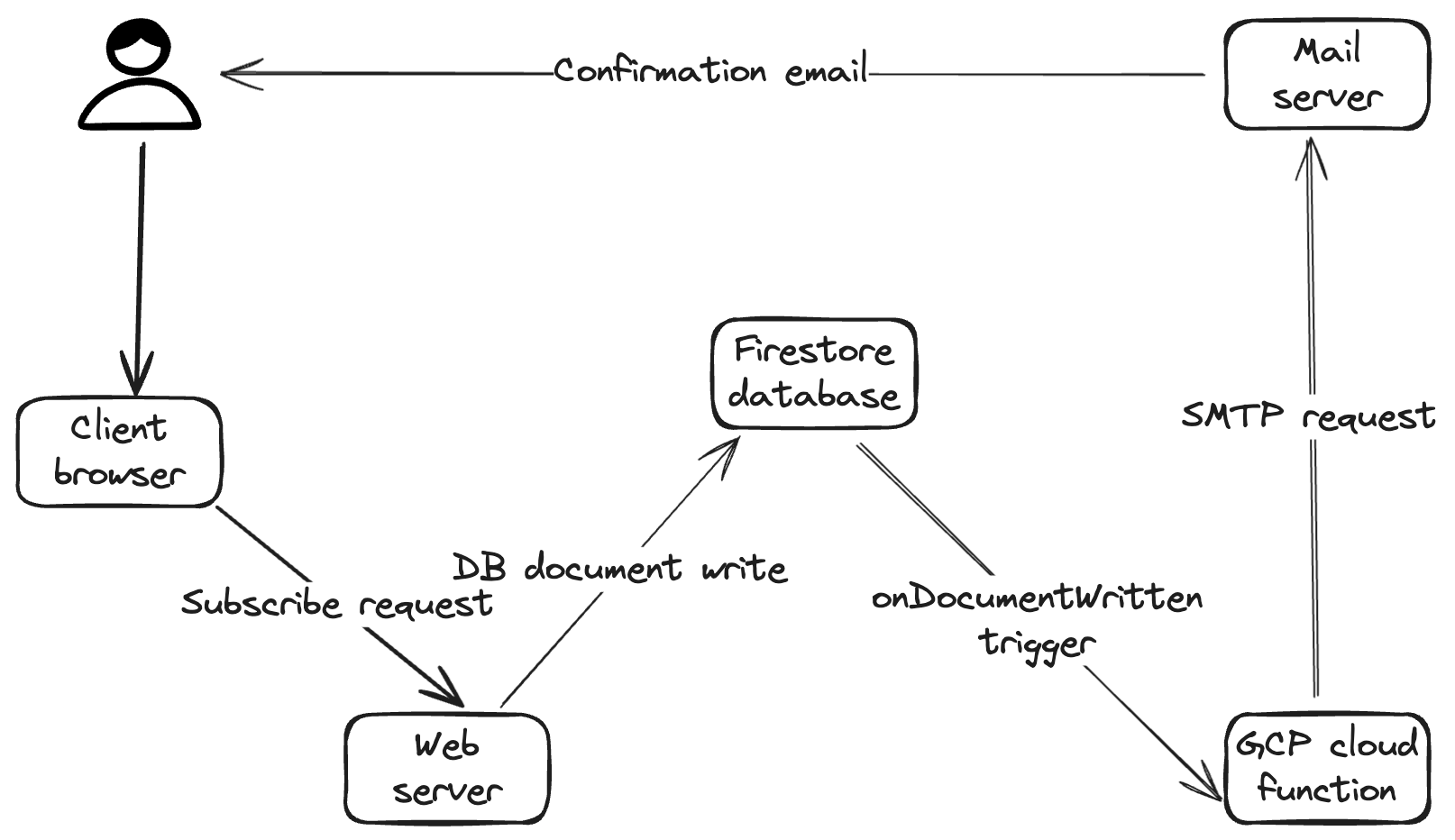
Ok, the storage side is sorted. Now to the event-triggering aspect of the feature. I essentially want a background task to be run every time a change happens in the database. For example, if a document is created after a user subscribes, I want to be notified that someone subscribed and I want to send a welcome email to the user. The reason why these post actions don't run on the actual API call a user subscribes with is that it will add unnecessary latency for the client to receive a response from the server, and If these post actions fail, it may also fail the browser's request. This is where Firestore triggers come in. Firestore triggers allow me to run a Google Cloud function every time a change happens on a Firestore document. This code runs separately from the web server and does not halt any user interactions.
HTML emails
Lastly, I needed to leverage my SMTP server to send HTML-formatted emails. Once again, I wanted to keep costs for this part of the feature near zero. Using a service like Twilio or Mailgun was out of the question. I could leverage my existing SMTP server and just send emails using something like nodemailer. So all was fine and dandy until I sent the first HTML email.
Email is a somewhat ancient means of communication. What's even worse is the various email client's lack of support for modern CSS. I found out very quickly what an HTML email displayed on my Mac's email client, rendered differently on Gmail on the browser, which rendered differently on my mobile email client. The CSS support for email clients is worse than Internet Explorer. These were my main pain points:
- No CSS scripts. Everything needed to be styled inline.
- No media queries. Hacking inline CSS properties with
widthandmax-widthwas required to handle both desktop and mobile layouts. - No Flexbox support. Who knew centering a
divwas so hard without a Flexbox. Creating single-column tables withalign="center" was common practice for HTML emails. svgtags were completely stripped out by Gmail. I had to convert these to PNG images and useimgtags instead.
Thanks to this tutorial by Envato, I was able to keep my sanity.
Key learnings
- Hashing the email to use as the database document identifier adds a layer of security for unsubscribing.
- Indexing documents based on the hashed string allowed for O1 lookup.
- Sending emails should be done in the background as non-blocking async code soon after the database write, not on the same API call as the database write for a subscribe action.
- HTML emails are hard.
- Email client's support for styling is very limited.
- People use services like MailChimp, Twilio and Mailgun for a damn good reason.
Here is my little architecture diagram btw.