Fighting off Automated Bots
November 10, 2025
•
4 min read
So, a couple of weeks ago, I started receiving numerous email notifications for people signing up for my newsletter. Initially, I thought nothing of it. Perhaps my LinkedIn profile got a few extra views for whatever reason. Then I started noticing a new subscriber every few hours. Giving the benefit of the doubt, I thought perhaps one of my blog posts was quoted somewhere and caught a bit of virality.
Investigation
So after a few days of consistently receiving a new subscriber every few hours, I knew something fishy was going on. Now I had to figure out where these subscribers were coming from. Were they hitting my REST endpoint directly? Or were they using my website form?
The first thing I did was check my analytics. As you can see, there were sudden massive spikes in page views and visitors.
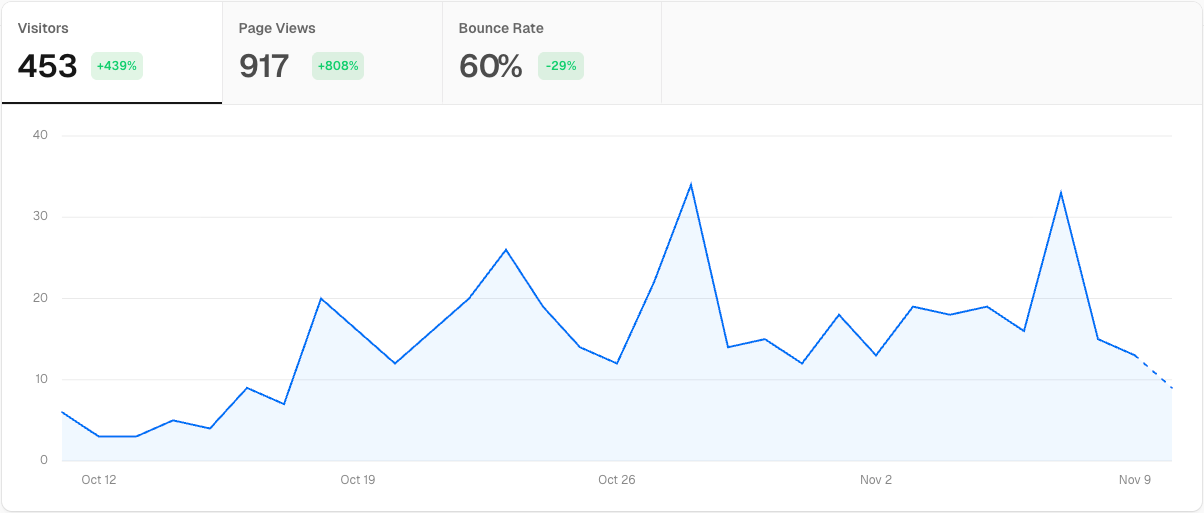
The next thing I found was that almost all the traffic was coming from the root directory of my website. All the subscribers had subscribed from the home page. What real user would subscribe from the home page without actually reading any blog post content? I mean, I do include the subscribe form at the bottom of each blog post.
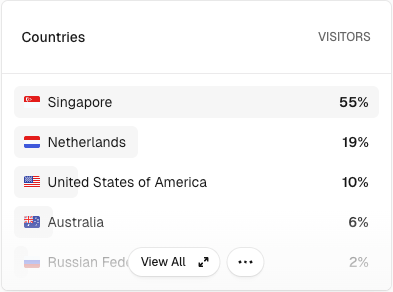
Next, it was to find out where the traffic was coming from. I assumed my content visitors would primarily come from Australia, given that my professional network is centred on Australian-based companies. This affirmed my suspicion that bots were trawling my website and signing up to my newsletter for some reason. Was it LLM bots randomly submitting forms to see if they could find an attack vector from the submission result?
The solution
Google reCAPTCHA v3 primarily detects bots through behavioural analysis and risk scoring, rather than user challenges. It is a frictionless process that does not interrupt the user's experience on the website. reCAPTCHA v3 analyses signals from user interaction, like mouse movement, scroll patterns, and click timing, then leverages machine learning algorithms to compare these behaviours against known bot patterns, assigning each request a score between 0.0 and 1.0 to indicate its likelihood of being a bot or human.
The implementation is quite simple. Include a script in the head of your site with your client-side key. Upon form submission, query the script to get a token that assesses the likelihood of a bot using the site and send the token along with the form data. On the server, the token gets verified against the server secret key, and a score between 0.0 and 1.0 is derived from the token. If the score is less than the threshold I set, I drop the request and send back a 400 Bad Request response.
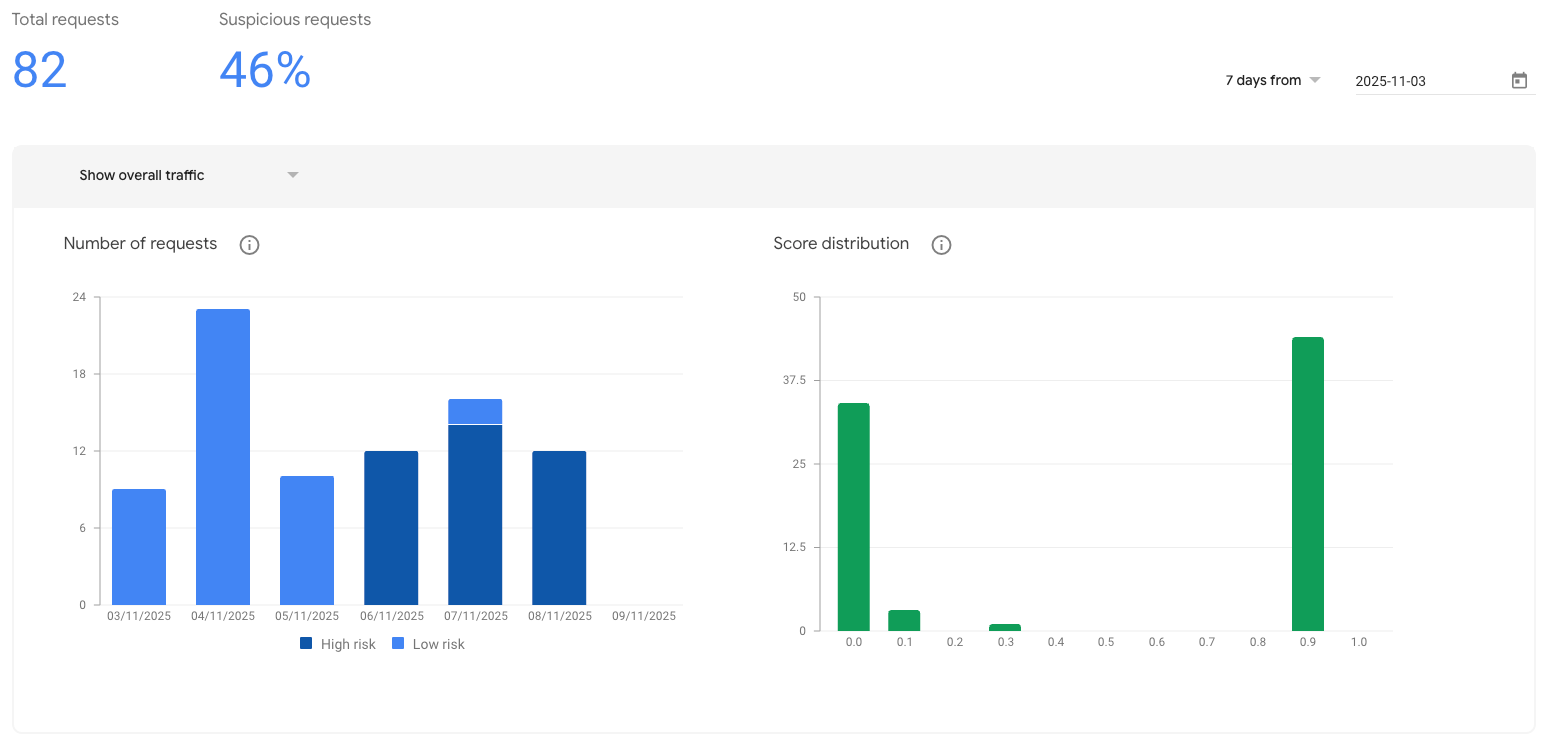
For the first 48 hours, I noticed all the requests were passing with a score of 0.9 (likely to be a human). I thought it was very strange. I even built my own bot using Playwright and passed with flying colours 🤔. Upon further research, I learnt that when reCAPTCHA v3 is first set up, or on low-traffic/new sites, it's common for almost all requests to return a score of 0.9, as Google has not yet gathered enough behavioural data to differentiate real users from bots in your context.
After 48 hours, reCAPTCHA was working in full force. All form submissions every few hours were now reporting a score of 0 (definitely a bot). I even noticed that once I responded with a 400 Bad Request, the bots would retry 2 more times in quick succession using the same email address. This kind of retry logic was a sure-fire way to expose itself a an automated bot.
Google reCAPTCHA offers up to 10,000 free assessments a month. This is a must for any public-facing website, especially in a time where AI bots are constantly trawling the internet for content, vulnerabilities or exploits.